
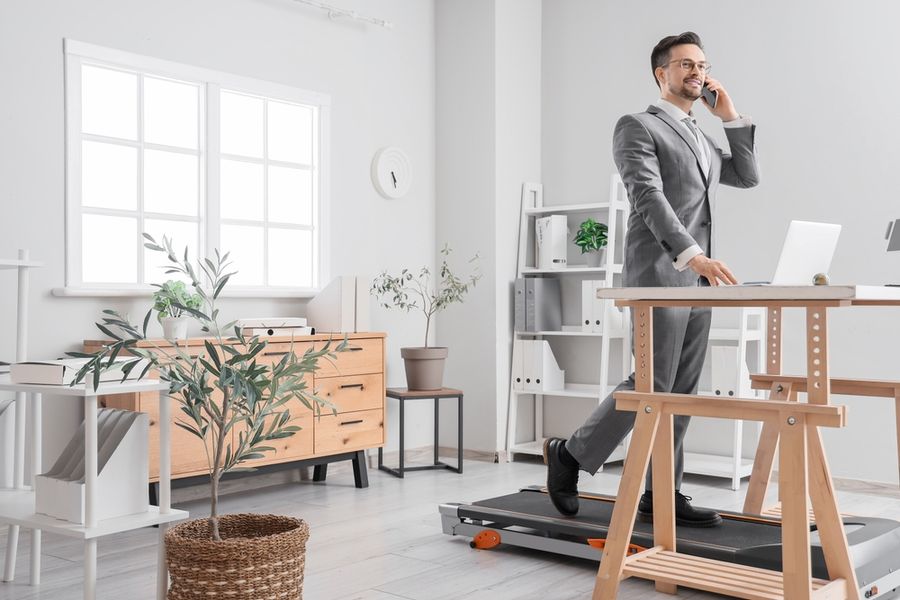
A desk treadmill often seems like an easy fix for a sitting-heavy job: step onto the belt, open a laptop, and walk for hours. The harder part is not the walking. It is choosing tasks, pace, posture, and timing that let movement support the work instead of making typing, meetings, or concentration more difficult. It's essential to understand strategies to leverage your desk treadmill effectively at work.
Have a Master Plan For Your Device
Without a plan, a useful tool can quickly become background furniture. Poor setup can cost time and comfort. A person who starts too fast may spend a morning correcting typing errors, gripping the desk, or stopping every few minutes because the screen and keyboard feel unstable.
The practical test is simple: a walking block should add movement without lowering the quality of the task or leaving you unusually tired. Fortunately, you can create a set-up that promotes everyday movement with ease.
Desk Walking in Plain English
Use the moving belt for slow activity during tasks that remain easy when your body is in motion. Listening to a call, reading a short document, clearing routine messages, or watching a training session may fit.
Precision work, confidential discussions, dense analysis, and deadline-sensitive writing often deserve a still position. Start with brief blocks and alternate among walking, standing, and sitting. Success means the work stays accurate, the setup feels comfortable, and the routine is easy to repeat.
How Walking and Computer Work Fit Together
A walking workstation combines a compact exercise belt with a desk set high enough for computer work. The purpose is not to recreate an outdoor workout inside an office. It is to replace selected periods of stillness with gentle movement while preserving control of the keyboard, mouse, screen, and conversation.
Federal guidance tells adults to move more and sit less, and it says even small amounts of activity can contribute to better health. The same guidance recommends a broader weekly mix that includes moderate-intensity aerobic exercise and muscle-strengthening work, so slow walking during office tasks should support a complete routine rather than replace one.
Task pairing makes the setup practical. A meeting where you mainly listen places fewer demands on your hands than editing a detailed spreadsheet. A recorded training session may allow an easy pace, while a live presentation may call for the belt to remain off so your voice, camera, and attention stay steady.
Transitions matter as much as walking time. Begin a session only after the desk, screen, and controls are ready, then slow down or stop before changing documents, answering an urgent message, or reaching for something. Treat the stop button as a normal work tool, not as proof that the session failed.
Five Desk Treadmill Strategies That Fit a Real Workday
1) Match Walking to Low-Focus Work
Use the treadmill for tasks that do not require precise hand movements or intense concentration. Listening to an internal call, watching a training session, reviewing notes, or clearing routine messages may work well. Stop the belt for detailed editing, calculations, careful formatting, or any task where small mistakes could create more work later.
2) Protect Your Concentration Blocks
Keep demanding assignments separate from walking sessions. Schedule focused writing, coding, analysis, client presentations, and difficult decisions for times when you are seated or standing still. Walk before or after those blocks so movement supports your energy without competing for your attention.
3) Build Time Gradually
Begin with one short walking period that ends before your feet, posture, or concentration begin to suffer. Repeat that routine until it feels comfortable, then extend it slightly or add another session later in the day. Reduce the duration when discomfort continues after you stop or affects the next task.
4) Use Position Changes, Not All-Day Walking
The goal is to interrupt long periods of stillness, not to remain on the treadmill through every work task. Rotate among walking, standing, and sitting based on what the assignment requires and how your body feels. Walk during lighter work, stand during brief transitions, and sit when you need stability or sustained concentration.
5) Create a Recurring Movement Cue
Connect walking to something that already happens in your schedule instead of waiting until you feel motivated. You might start the belt during a weekly team update, a recorded training session, or routine email review after lunch. A repeated cue removes some of the daily decision-making and makes the habit easier to maintain.
Mistakes That Turn Movement Into a Distraction
More walking time always creates a better routine.
The reality: A long session that causes sore feet, tense shoulders, or weak concentration is less useful than several manageable blocks. Duration should rise only when comfort and work quality remain steady.
Every computer task can be completed while moving.
The reality: Some assignments demand stillness. Detailed calculations, precise mouse work, difficult writing, sensitive conversations, and urgent decisions may be faster and more accurate when the belt is stopped.
Slow office walking is a complete fitness plan.
The reality: Gentle movement can help break up sitting, but federal recommendations also include moderate-intensity aerobic activity and muscle-strengthening exercise. A balanced routine leaves room for purposeful exercise away from the workstation.
Choose a Routine That Matches Your Job
If most of your day involves calls, reading, and training, task pairing is the main decision. Mark a few listening-heavy periods as possible walking blocks, and keep presentations or conversations that need a steady camera separate. If your work centers on code, design, spreadsheets, or long-form writing, timing matters more, so place movement between demanding assignments or during routine review.
Scenario recommendation: If you are a hybrid employee with back-to-back internal calls and one major writing block each afternoon, the most important factor is protecting that writing block. Walk during calls where you mainly listen, then stop the belt before drafting so movement never competes with your highest-focus task.
People who share a workstation should also plan for adjustment time. Desk height, screen position, and walking comfort vary by person, so a setup that works well for one employee may feel awkward for another. Save or mark individual desk positions when possible, and reset the area before each session.
Frequently Asked Questions
How long should a beginner walk while working?
Begin with a short block that feels easy and ends before fatigue changes your posture or attention. Add time gradually only when you can finish the same type of task with normal accuracy and comfort. A repeatable session is more useful than a long first attempt followed by several days of avoidance.
Which work tasks are easiest to pair with walking?
Listening-heavy calls, recorded training, document review, light research, and routine inbox work are common starting points. Tasks that require quick mouse movements, careful formatting, complex reasoning, or emotional focus are often better completed while still.
Should I walk during video meetings?
Use the belt only when the camera remains steady, the microphone does not pick up distracting noise, and your role in the meeting allows movement. Stop before presenting, sharing sensitive information, or leading a discussion that requires close attention to other people.
Can a desk treadmill replace regular exercise?
No, but it can add gentle movement and reduce some periods of sitting. Maintain separate exercise in the week and view workplace walking as an added layer.
Turn One Work Task Into a Movement Habit
Choose one recurring low-focus task and write it on a note as your first walking block for the next workday. Afterward, record whether your work stayed accurate, your posture stayed relaxed, and you finished with enough energy to repeat the routine.
We created this article in conjunction with AI technology, then made sure it was fact-checked and edited by a TopicTangent editor.